Configure DHCP Option 160 with System URL
| ● | This configuration is applicable when Zero Touch is not used to provision the phones. |
| ● | The instructions below therefore describe a provisioning method that is not the choice method. |
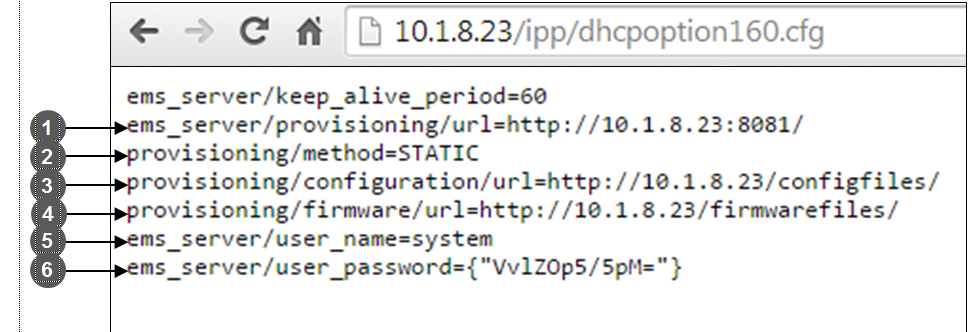
The figure below shows the file dhcpoption160.cfg located on the server.
|
Legend |
Description |
|---|---|
|
1 |
Points to the URL of the OVOC provisioning server. |
|
2 |
STATIC provisioning method, so the cfg and img files are automatically pulled from the |
|
3 |
Location of the cfg file, pulled by the phones when they're plugged into the network, on the |
|
4 |
Location of the img file, pulled by the phones when they're plugged into the network, on the |
|
5 |
Name of the 'system user', necessary for basic REST API authentication when the phones are plugged in to the network for the first time. |
|
6 |
(Encrypted) Password of the 'system user', necessary for basic REST API authentication when the phones are plugged in to the network for the first time. |
| ● | The dhcpoption160.cfg file is created when logging in for the first time to Device Manager |
| ● | The file is an internal OVOC file and cannot be manually modified. |
After installation, the first, second and third lines in the file are automatically updated.